Release 4.1 Notes
Wi-Fi
Wi-Fi features in this release require a new firmware update that will be released separately in April.
Multi-PSK Service – PAN Manager (GA)
Multi-PSK (Pre-Shared Key) service for PAN Manager is now Generally Available. Administrators can define multiple passphrases per SSID for differentiated access policies without deploying separate SSIDs. 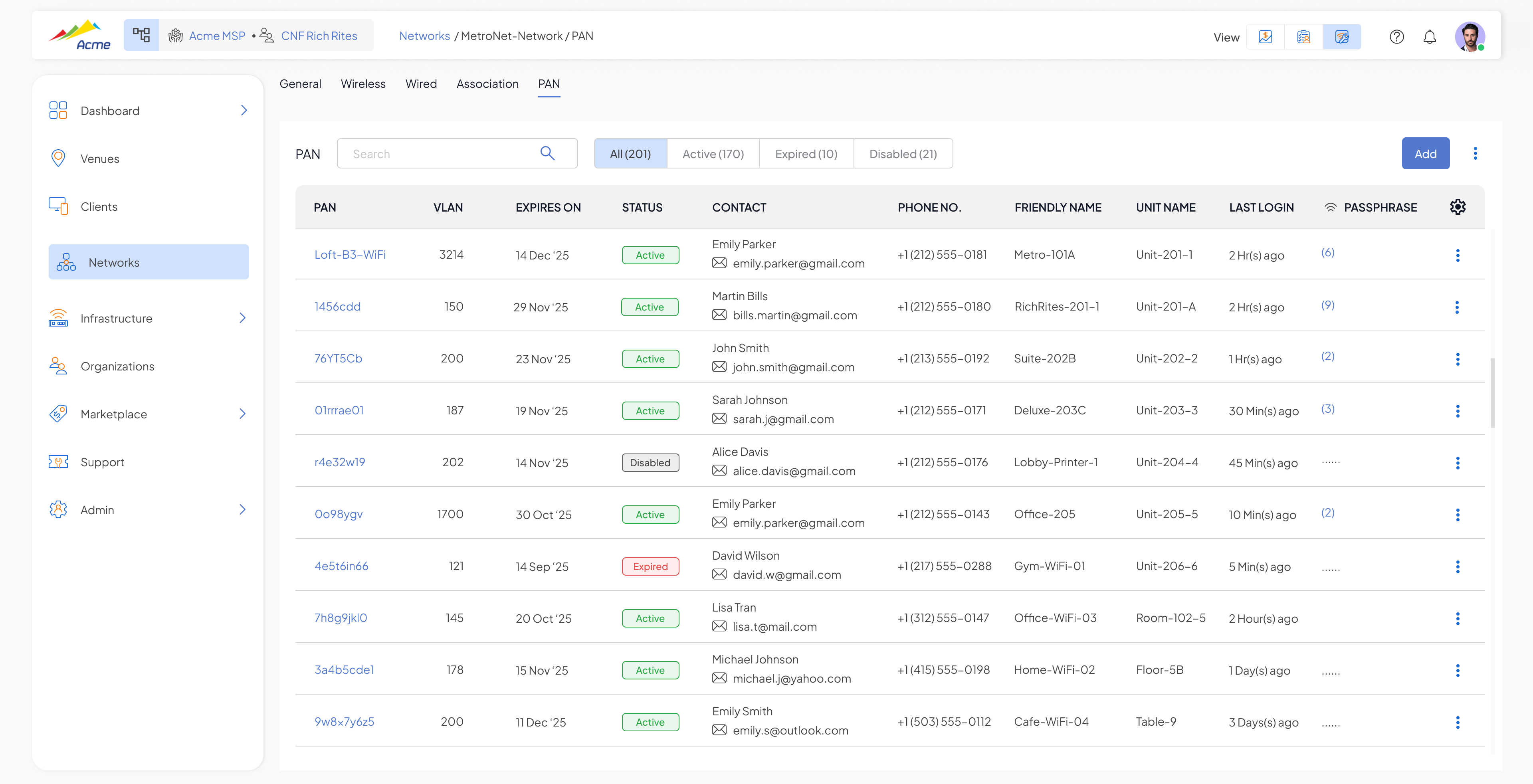
Wireless Client "Disconnect" Action
Administrators can now disconnect a wireless client from the Clients list view using a dedicated “Disconnect” action. Unlike Ban, the client can reconnect. For MPSK Service, clients are automatically disconnected when their passphrase expires. Disconnect reason is shown as “Admin Disconnect” or “MPSK Expired.” 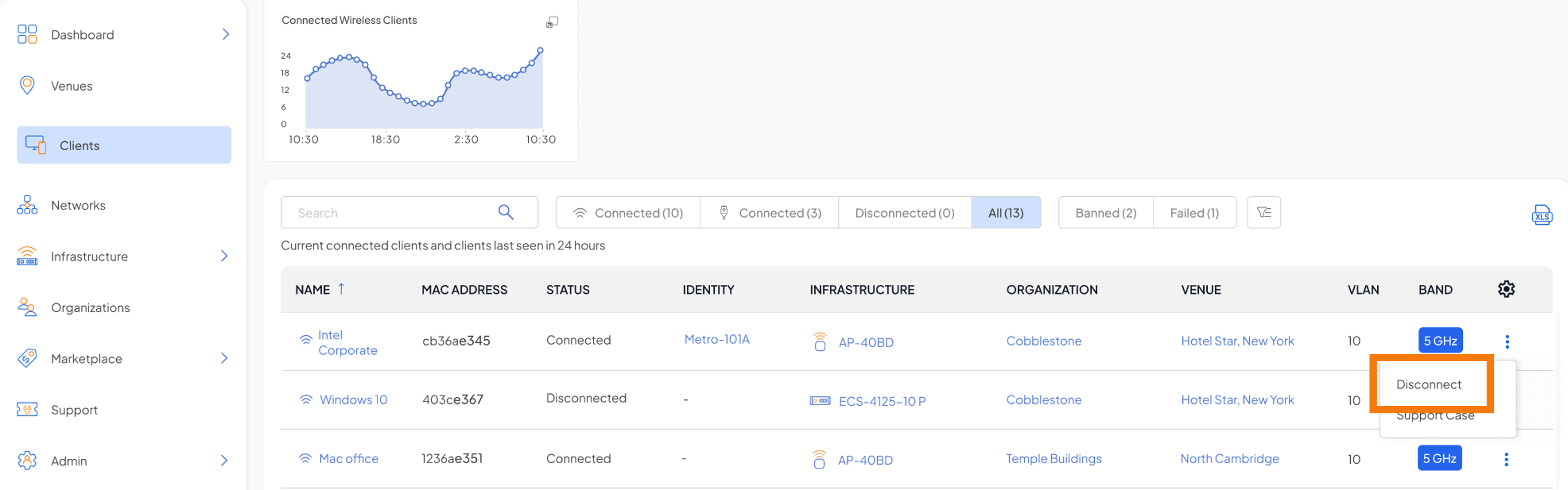
AP – Ability to Disable 1G Uplink Warning
Administrators can now suppress the 1 Gbps uplink alarm when the configured speed is below 1 Gbps, helping reduce unnecessary alert noise for APs intentionally operating below 1 Gbps uplinks. 
Configure RadSec Settings in Networks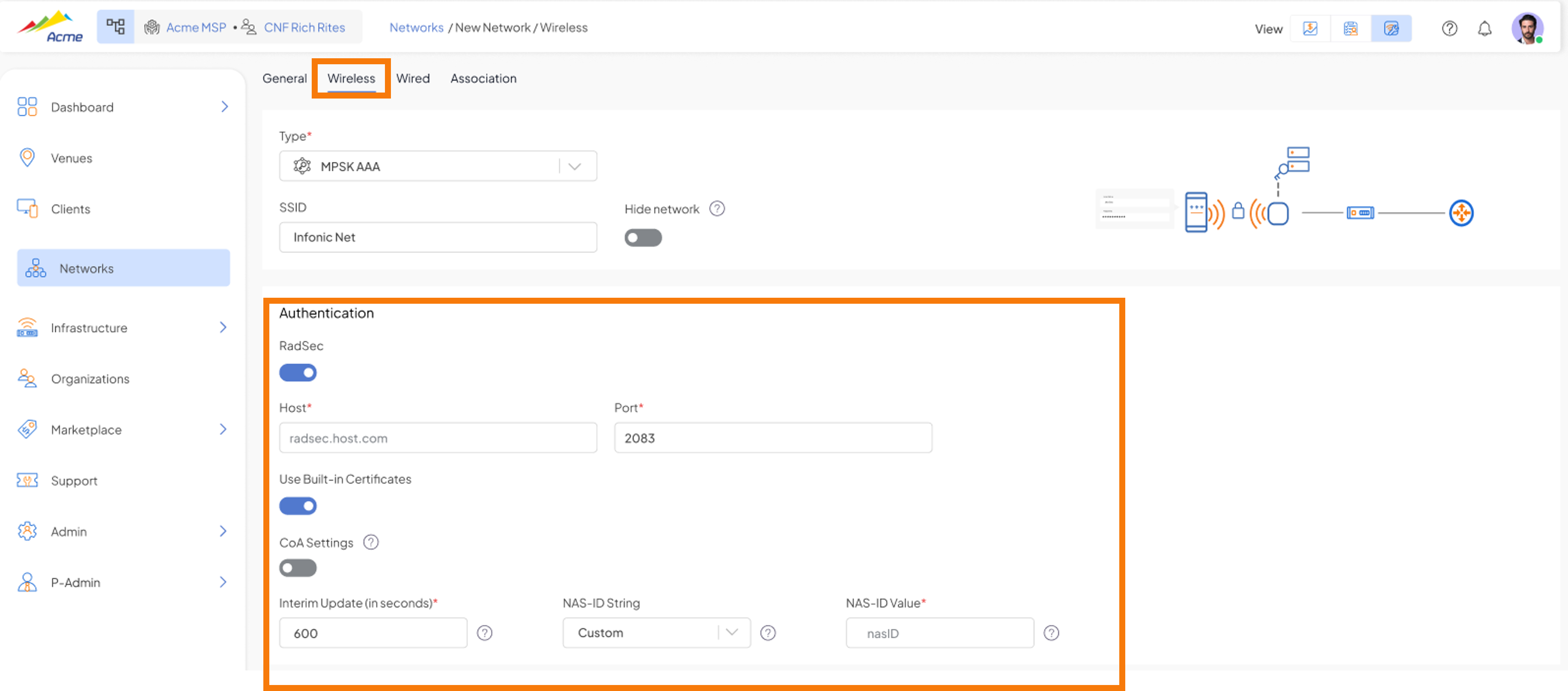
Note:
- Will be deprecating AP Profiles later in the year
- RadSec settings for non vStack venues can still configured from AP Profile.
- LED cfg control under vStack (currently under AP profile)
Switching – vStack (Beta)
vStack is Shasta’s unified switch management layer. Release 4.1 adds improved configuration flows, expanded port-level control, and new L2/L3 capabilities.
Port Speed & Duplex – Auto Negotiation
Speed and Duplex settings are now combined into a single control with a new Auto-negotiate default. Support for 10M/Half duplex is available on select hardware SKUs. 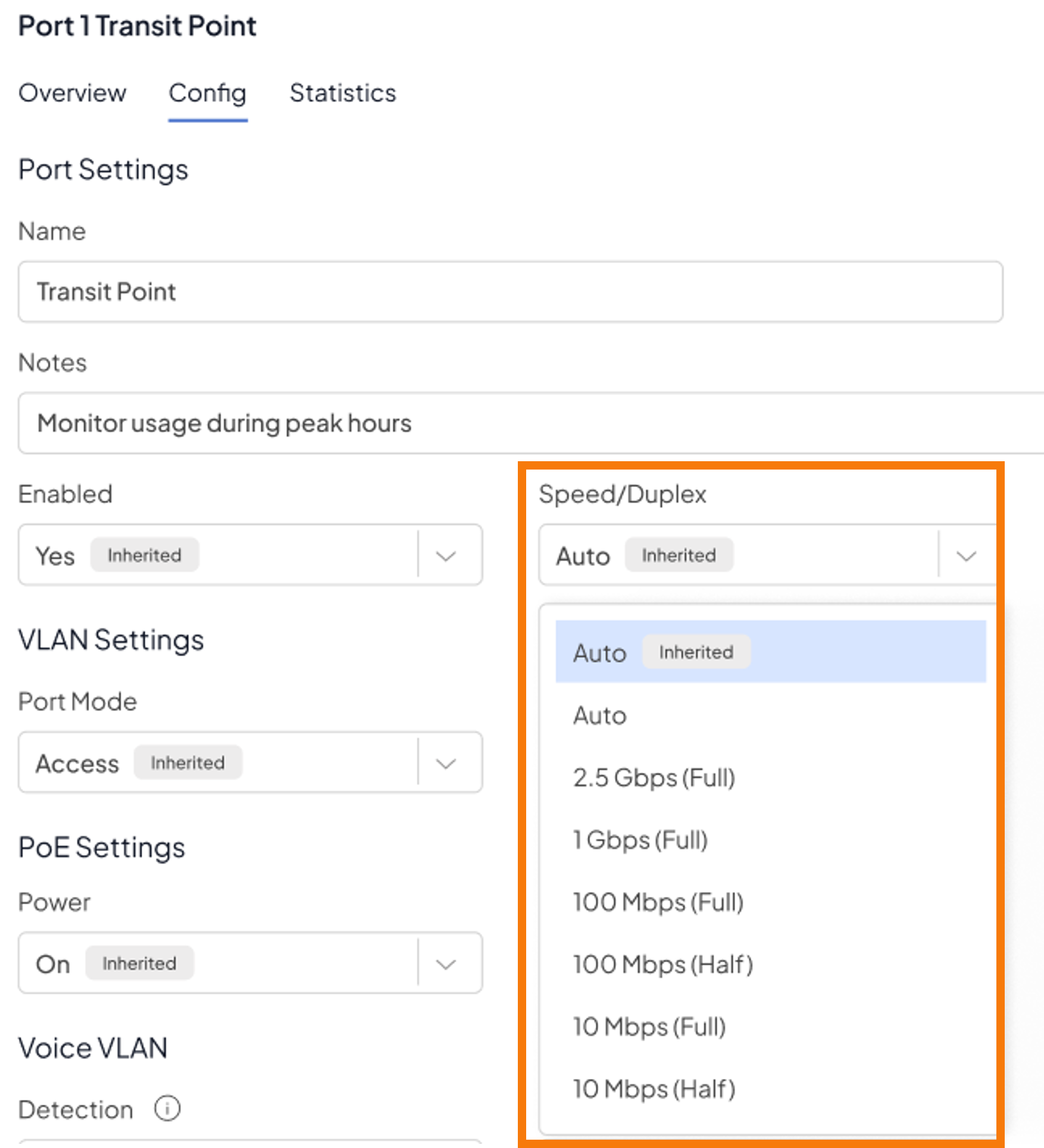
- Speed & Duplex consolidated to a single unified setting
- Auto-negotiate option now available per port
- 10Mbps / Half duplex support on select hardware SKUs. E.g. 4150-28P supports, 4150-54p does NOT
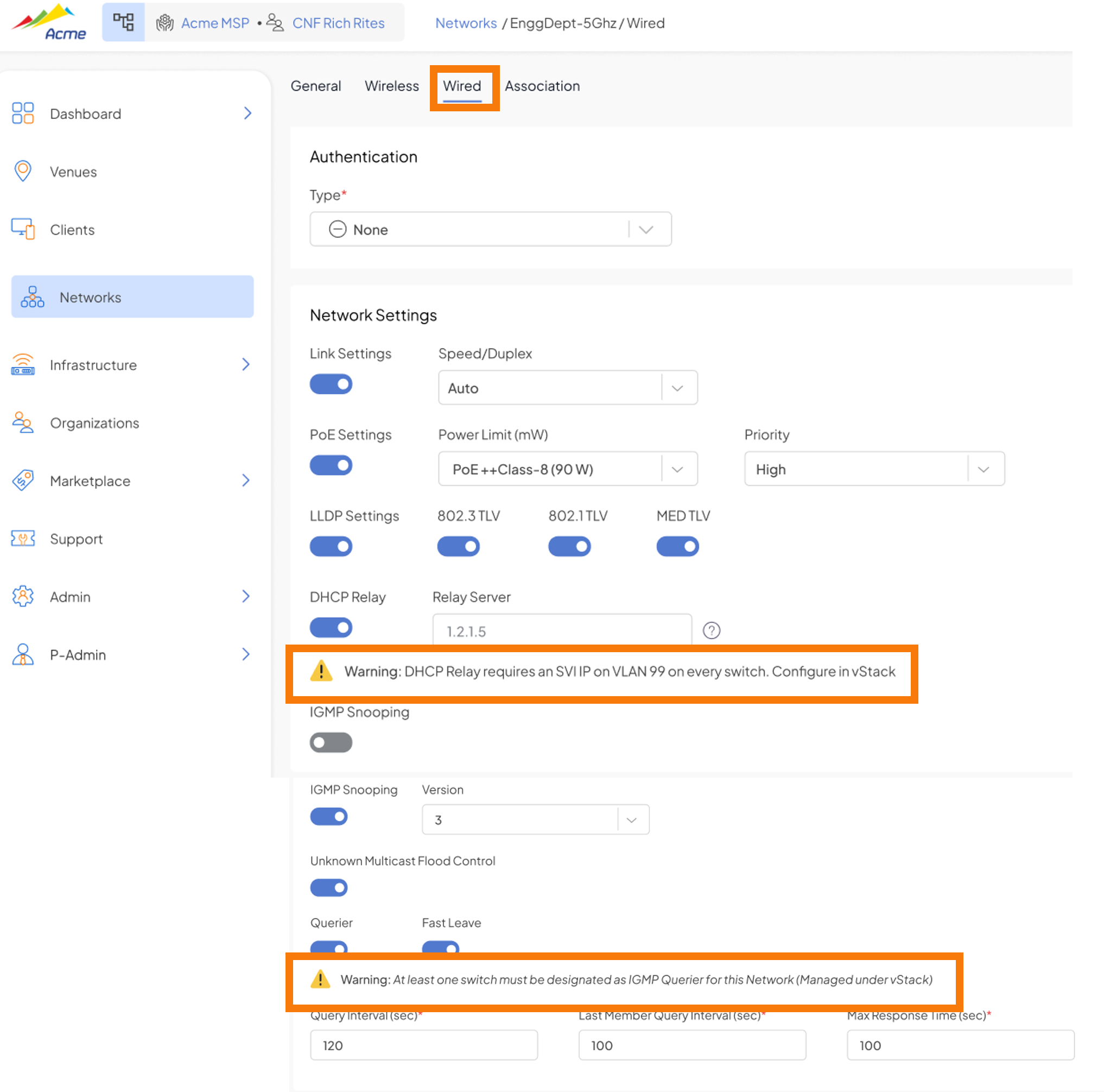
vStack – Configuration: IGMP Querier & STP Priority
The vStack configuration page now includes custom Spanning Tree Bridge Priority and IGMP Querier designation, enabling STP root bridge election and multicast group management from the Shasta Cloud UI. 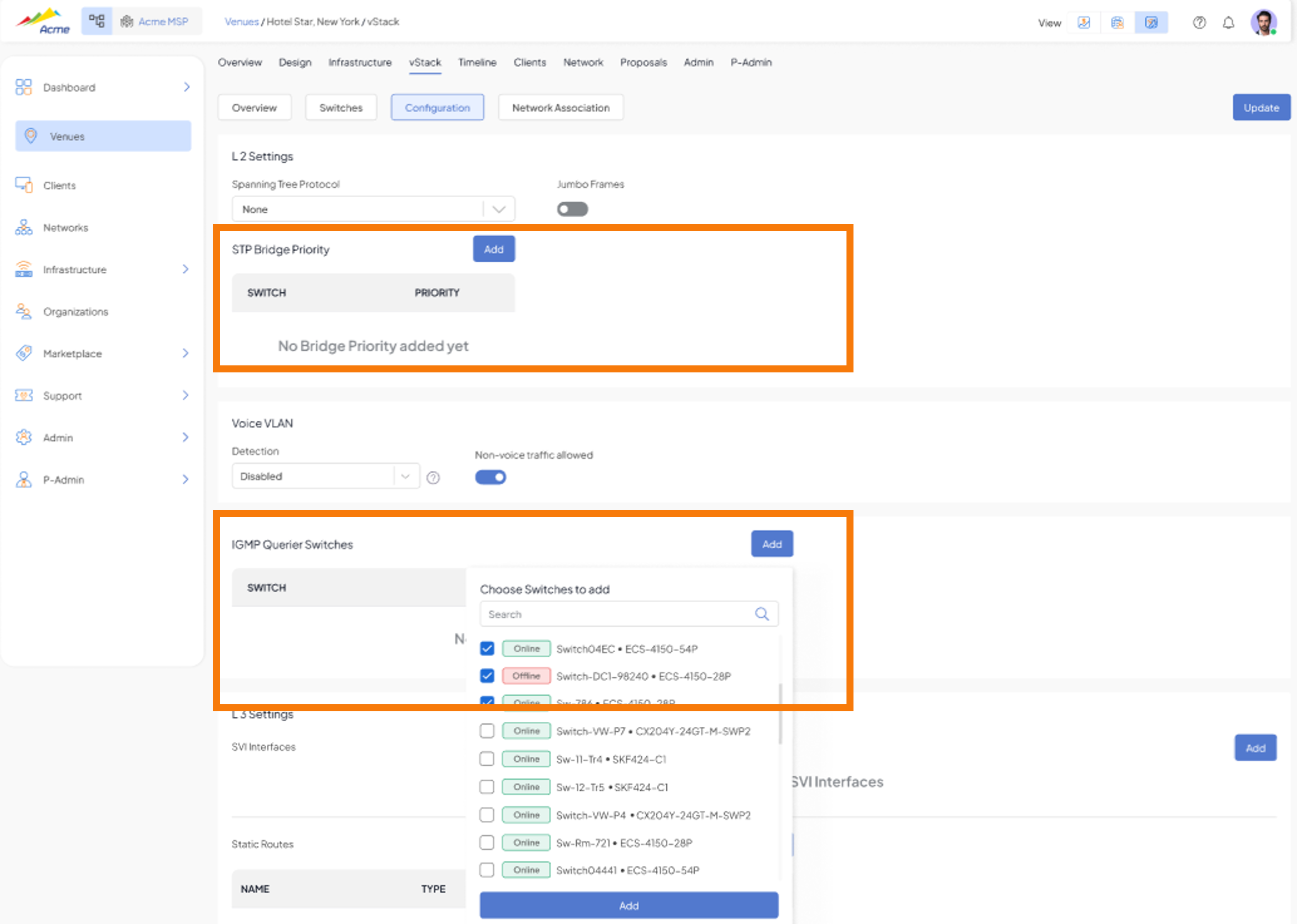
- Set a custom STP bridge priority per switch within the vStack
- Designate one or more switches as IGMP Queriers for multicast group management
vStack – Configuration: SVI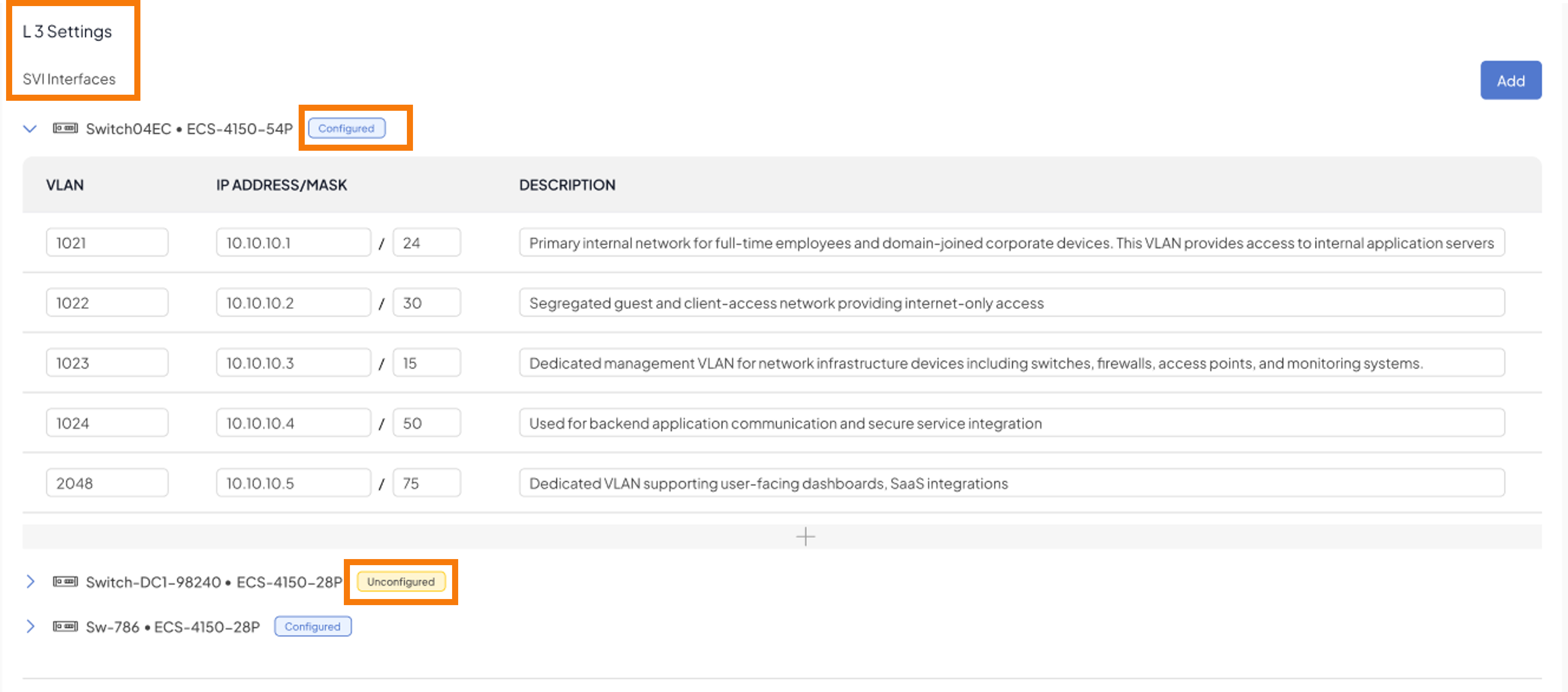
vStack – LED & SSH Control
SSH access for APs and Switches is now controlled at the venue level instead of the AP/Switch Profile level. Shasta can enable SSH permissions per MSP or per Business Org using feature flags, and MSP Admins can then enable SSH per venue. A timeline event is logged when a user connects via SSH. 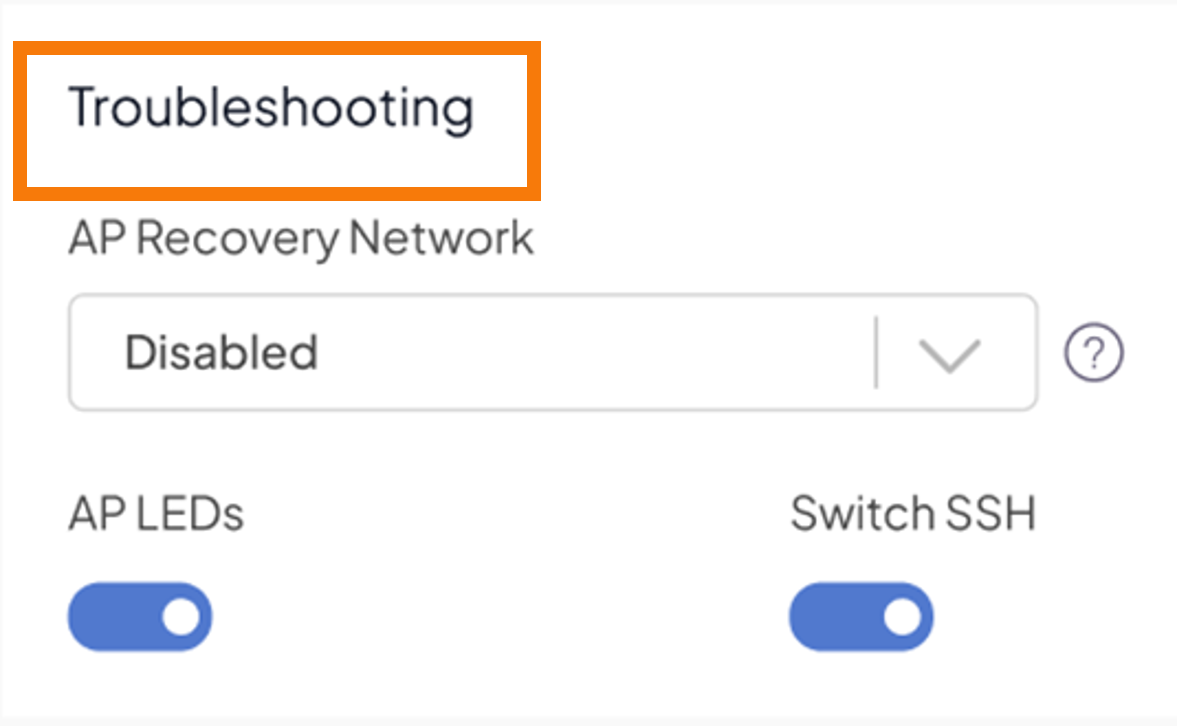
- Switch SSH access available for select venues and organizations (Shasta-provisioned access)
Networks – Wired Configuration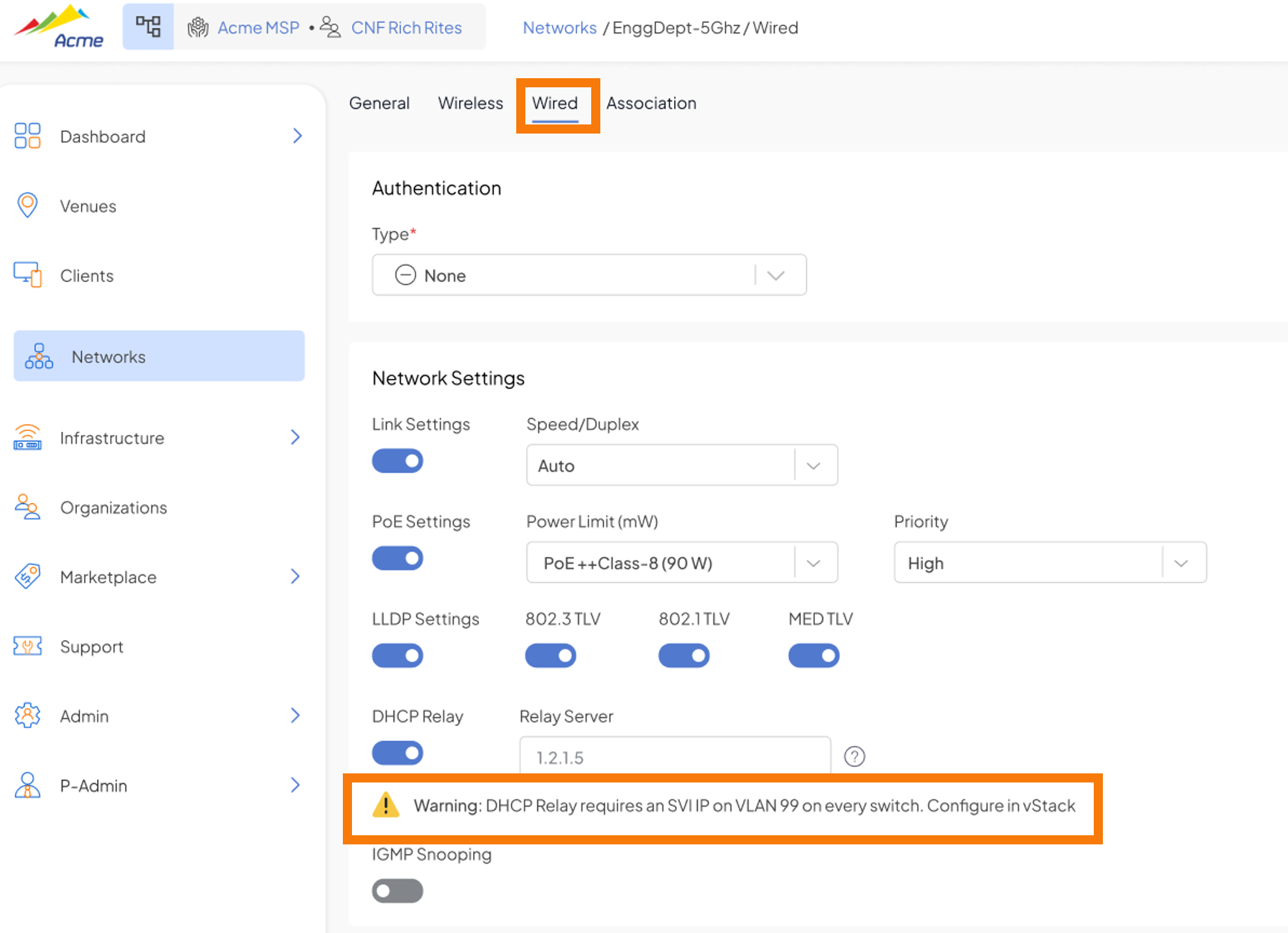
Networks – Wired Port Association: AP LAN Ports
Wireless and Wired network types can now be associated to AP LAN ports from the Network Association view, extending unified network policy management to wired endpoints attached to APs. 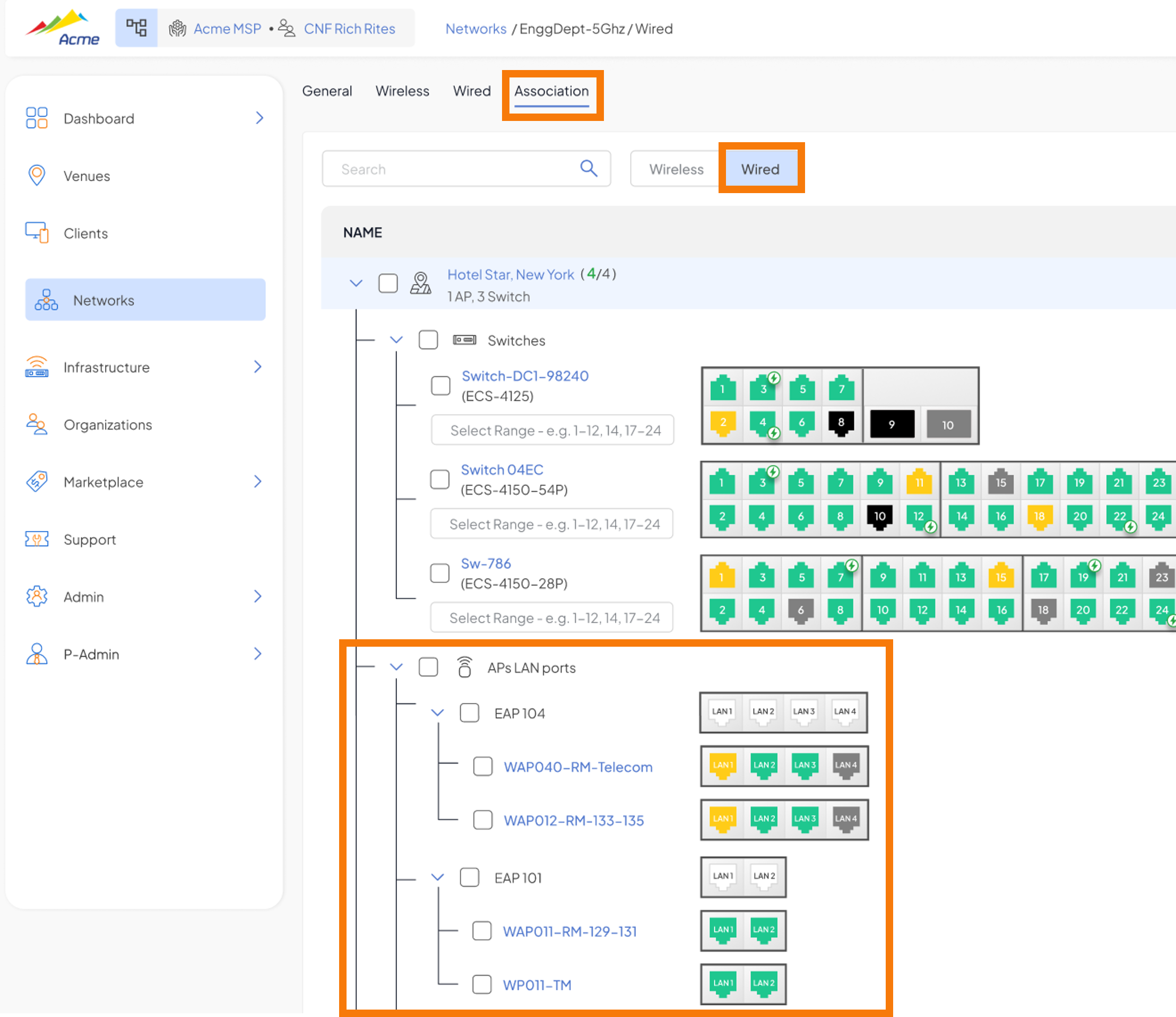
- Wireless + Wired combined network types now associable to AP LAN ports
- Visible under Network → Association → Wired tab, with AP LAN port selection
Platform
Configuration Sync Status for APs and Switches
A new Configuration Sync column on the Infrastructure list view displays the synchronization state of configuration updates for every AP and switch. A Re-Sync option is available per device to re-generate and push configuration regardless of current state. 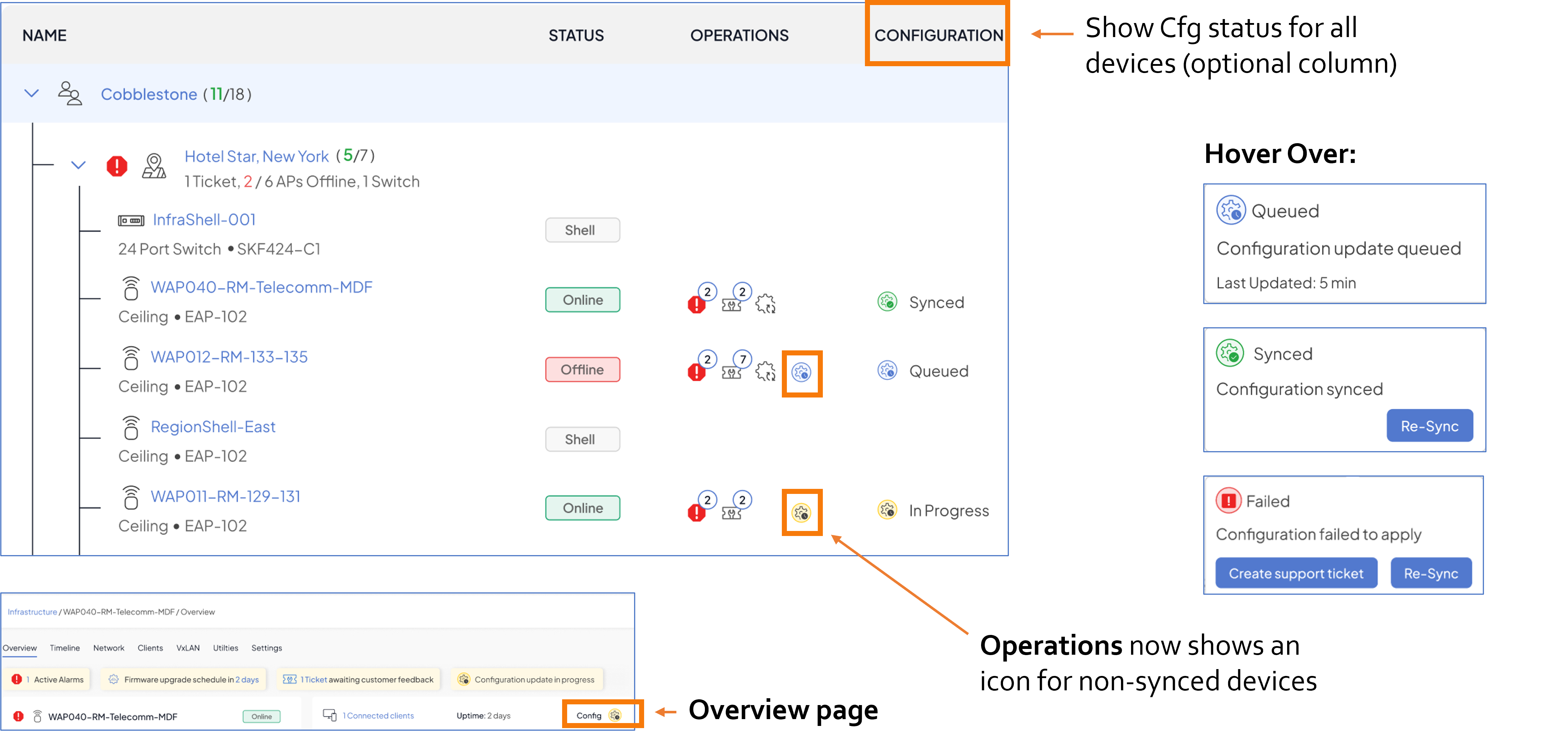
Sync status states include:
- Synced – configuration has been successfully applied to the device
- In Progress – configuration update is currently being applied
- Failed – configuration update failed to apply; Re-Sync option available to retry
The sync status is also shown on the AP/Switch overview page.
AP/Client Uplink Interface View (Online & Historical)
The AP overview now includes an Uplink card showing the connected switch and port (via LLDP), with a “Last connected to” historical record for recently disconnected uplinks. 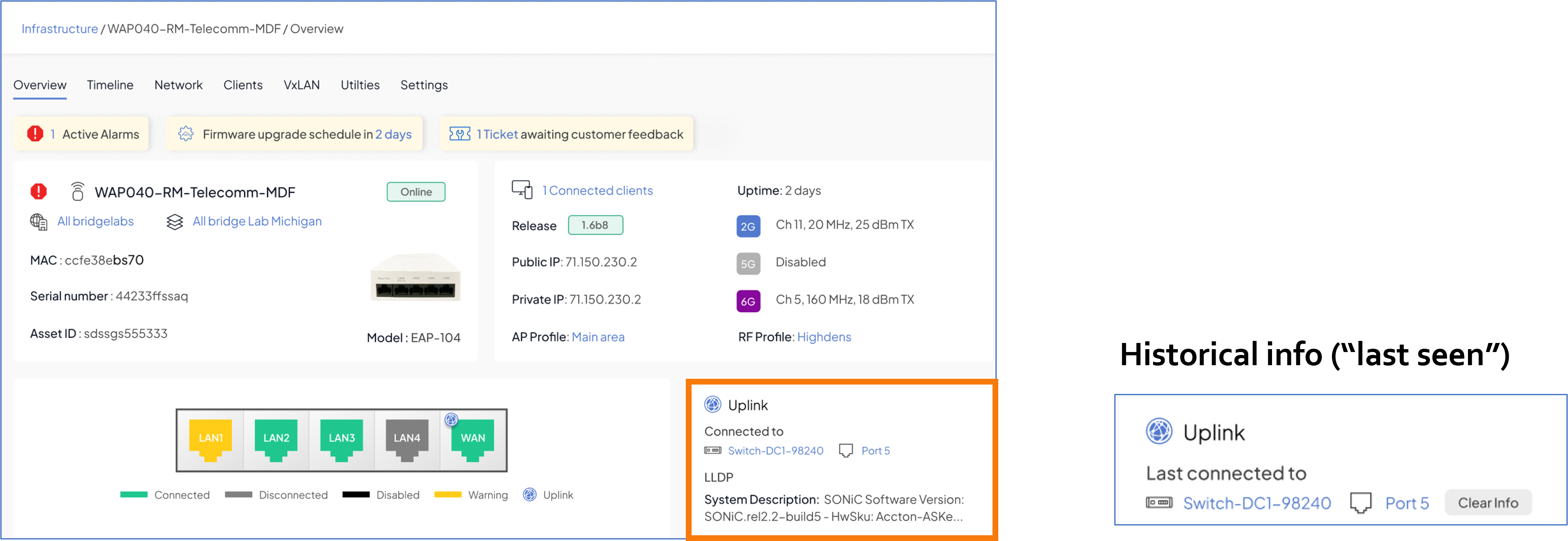
- Uplink card displays current switch name, port number, and LLDP system description
- Historical “Last connected to” info retained for recently offline APs
- “Clear Info” option to reset historical uplink data
Connected To – Switch Port Table Enhancements
The Switch Port table now includes new columns and inline editing for richer context about what is connected to each port. 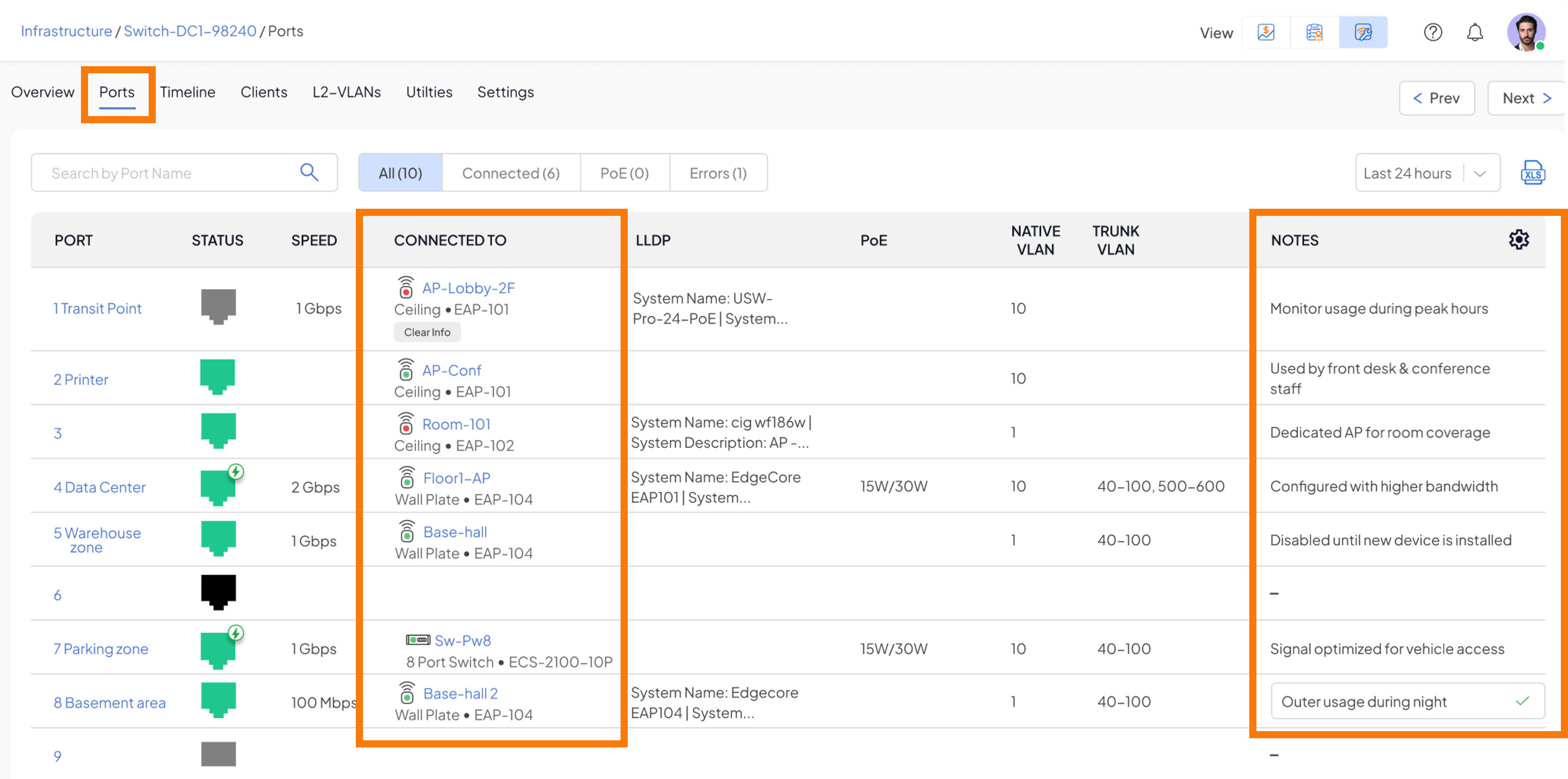
New columns added to the Switch Port table:
- Connected To – shows the device (AP, switch, or client) connected to the port
- Notes – inline editable field for adding operator notes per port
Connected To – Switch Port Table Enhancements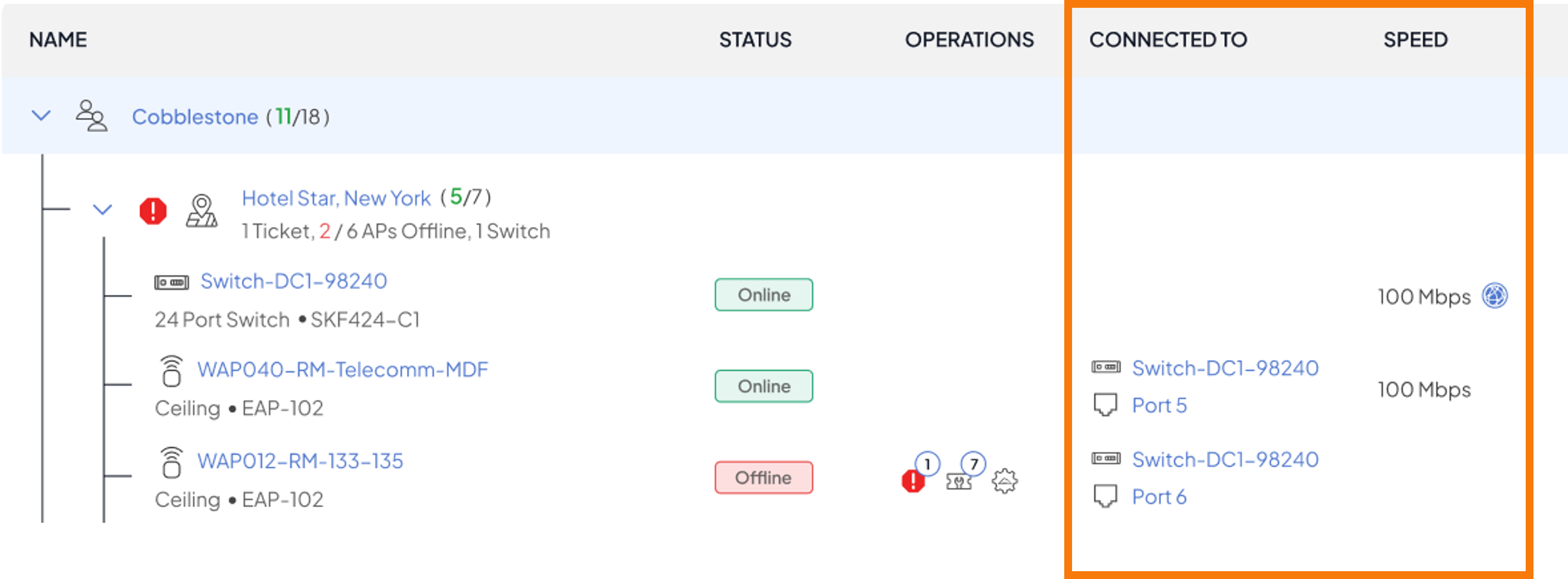
Refined & Updated Alarm Severities
Alarm severity levels have been reclassified to better reflect operational impact. Key changes: losing connection to a single AP/Switch is now Major; losing >30% of venue infrastructure is Critical. AP-level AAA/DNS failures are Major while venue-level failures are Critical. Rogue AP alarms are Minor and shown only at venue level.
- Alarm severity categories: Critical, Major, Minor
- Severity assignments re-evaluated across all alarm types for accuracy
- Alarm filtering and acknowledgment workflows reflect updated severity classifications
Infrastructure – New Device Actions
The per-device action menu now includes a Connect (RTTY) option for in-browser terminal access (when SSH permission is enabled for MSP). 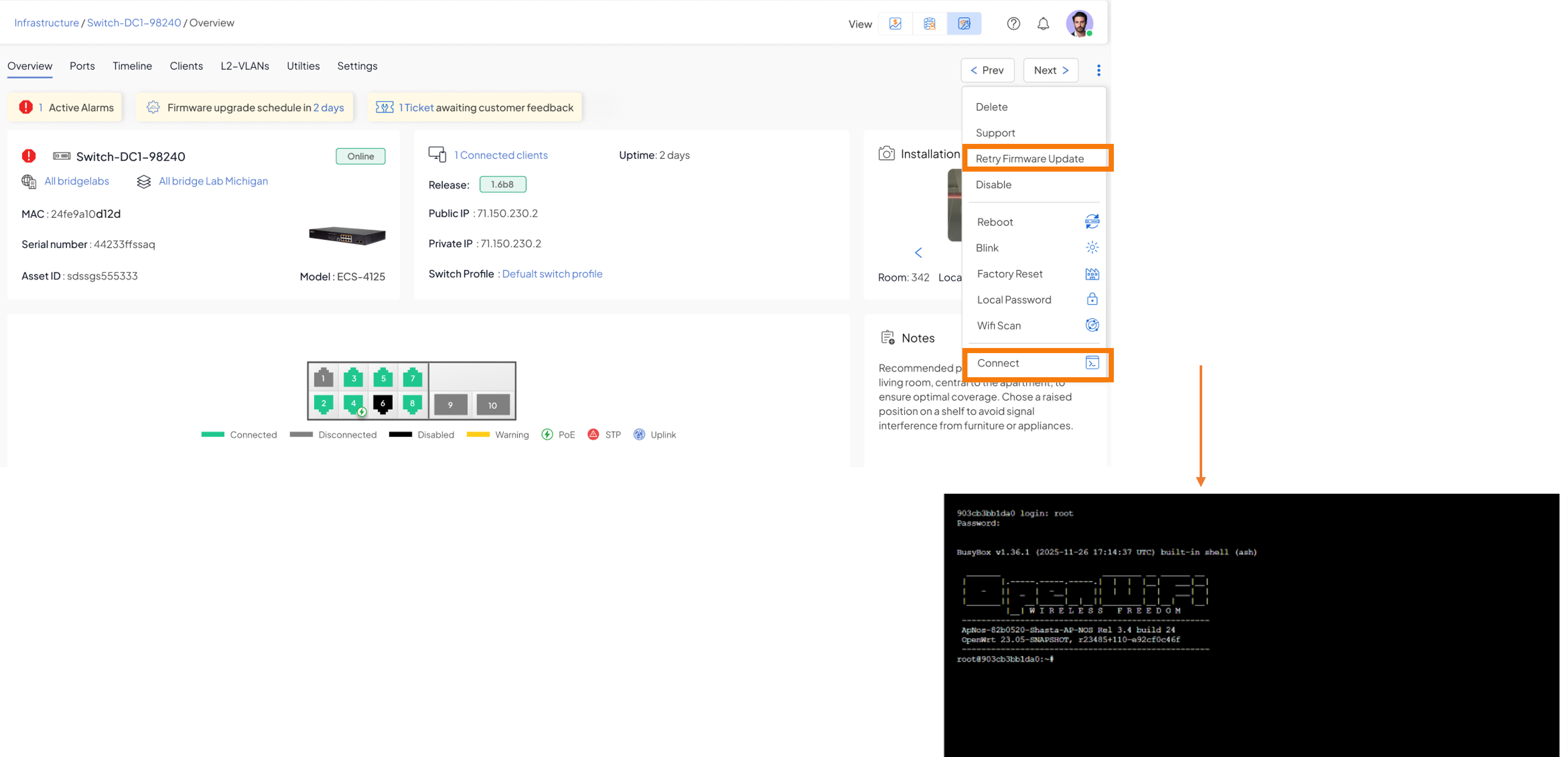
- RTTY terminal window – opens in a new browser tab for direct device access
- Requires SSH permission to be enabled (Shasta-provisioned for select venues/organizations)
- Additional device actions available: Retry Firmware Update, Reboot, Blink, Factory Reset, Local Password, WiFi Scan
Web UI
Refined Firmware Upgrade – Upgrade Sequence Display
The firmware upgrade workflow now displays the full upgrade execution sequence. APs are upgraded first, followed by a 5-minute wireless validation window, then switches are upgraded from the network edge inward to the core. The UX now clearly shows the upgrade stage and any delays. 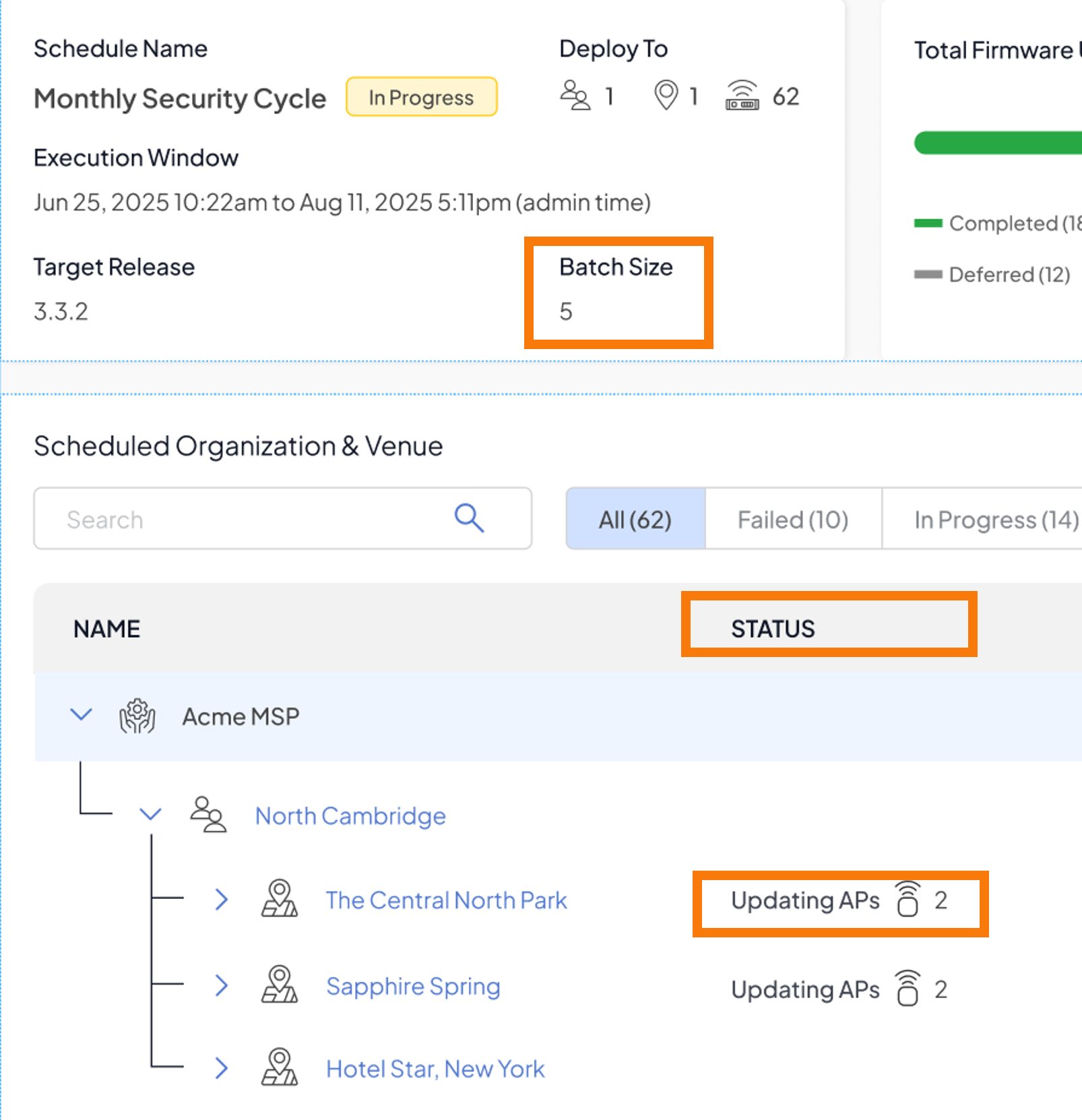
Upgrade sequence:
- Step 1 – Upgrade APs across targeted venues
- Step 2 – Validate wireless network connectivity (5-minute validation window)
- Step 3 – Upgrade switches, processed from the network edge to the core based on topology
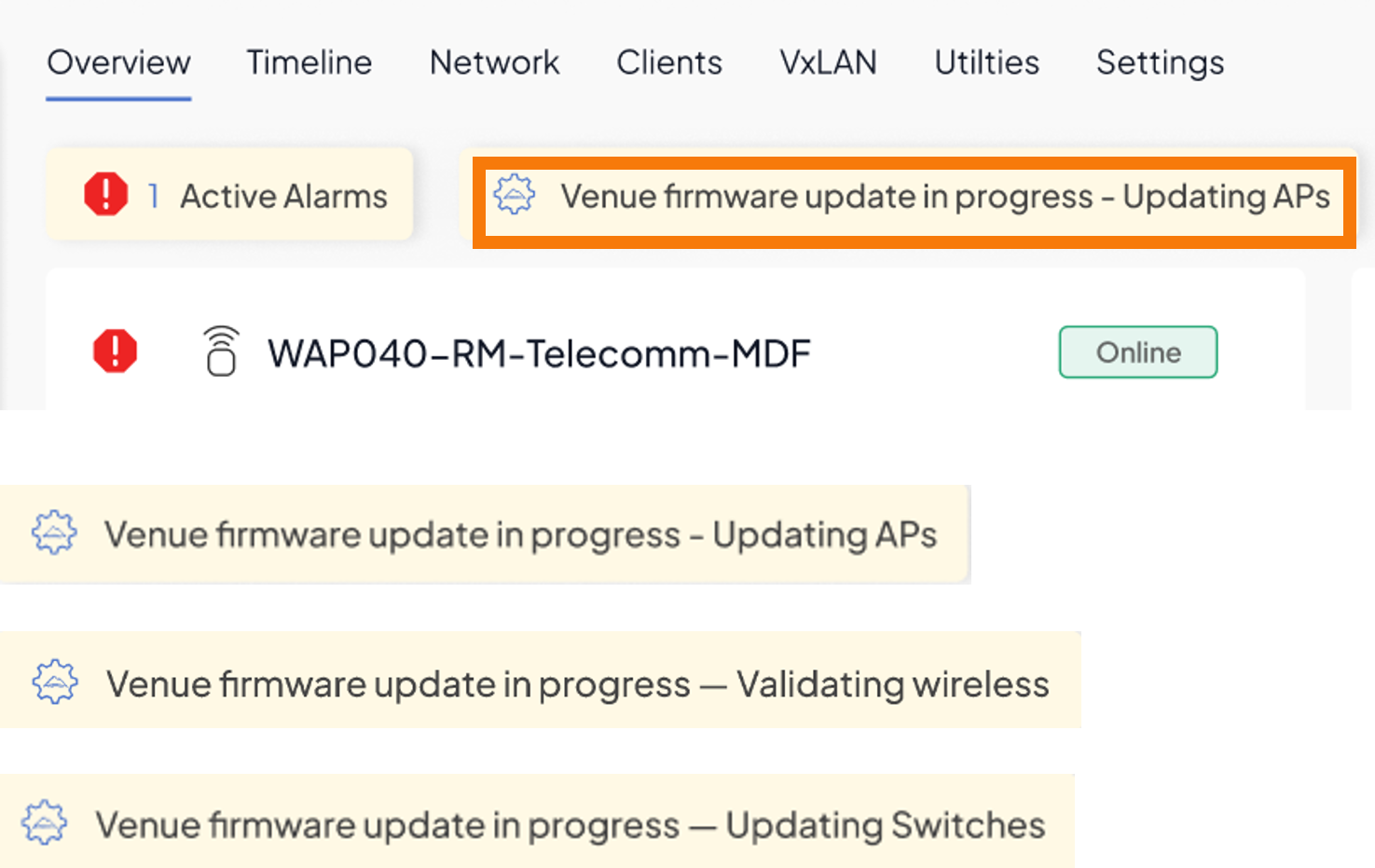
Status display available under Venue and Infrastructure views during an active upgrade.
Note: Additional firmware upgrade improvements are planned for Release 4.2.
Bulk Alarm Acknowledgment – Venue Level
Administrators can now bulk-acknowledge multiple alarms at the venue level using checkbox selection across alarm types (Tickets, Alarms, Notifications). The confirmation dialog has been removed for faster workflow. 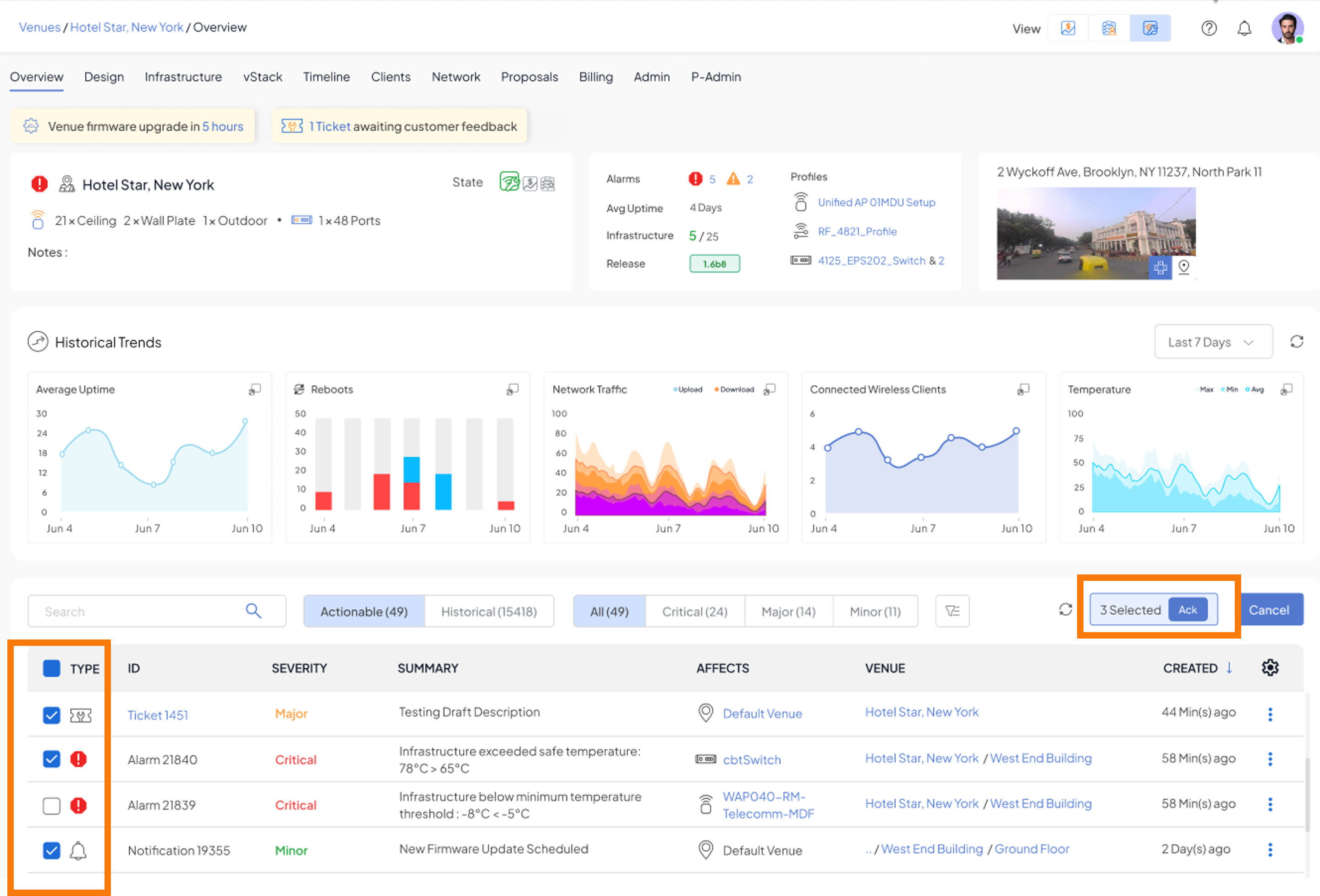
- Select multiple alarms using row checkboxes on the Venue Overview → Alarms tab
- Bulk acknowledge across mixed alarm types in a single action
- Selection count displayed alongside the Ack button for confirmation
Venue delete – added smart confirmation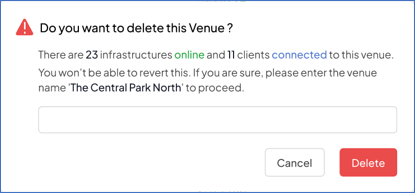
Fixed Issues
- Case #2933 - API - Allow a complete list of infrastructures to be provided
- Case #3499 - Add the name of the venue we are deleting in the "Are you sure ?" Prompt
- Case #4847 - ...more option does not work when trying to filter by firmware version
- Case #4997 - Useless WiFi image takes up most of screen
- Case #5001 - Incorrect verbiage and inconsistent/missing spaces
- Case #5285 - Allow VLANs to be disabled in infrastructure "inherit" config.
- Case #5360 - Alarm spam when receiving less than 1Gbps
- Case #5411 - Loud Fan
- Case #5416 - Configuration Sync Pending
- Case #5468 - Ability to schedule automatic updates for all hardware, default should be enabled.
- Case #5539 - CyberTAN switch firmware update
- Case #5541 - View associated switchport when viewing an AP in Infrastructure view, and also Alarm
- Case #5594 - Feature Request - allow enable/disable proxy-reporting when enabling IGMP Snooping
- Case #5608 - Infrastructure Page - New Column Request (Link Speed)
- Case #5618 - Switch sync status - visible in GUI
- Case #5619 - Switch config defaulted and won't accept new configuration after testing 10 Mbps half duplex
- Case #5620 - 10 Mbps half duplex not allowing us to set or use
- Case #5628 - support for providing Events for any wired client connection and disconnection from/to any switch port, Accesspoint port.
- Case #5633 - Unknown Mac-address learnt on switch Port
- Case #5644 - bulk acknowledgement - going through all the alarms and notifications. very difficulty to acknowledge
- Case #5698 - Marketplace default
- Case #5711 - Bond Issues
- Case #5777 - All AP's keep loosing connection to cloud. AP's are functioning locally
- Case #5798 - Switch moved to Non existing Venue
- Case #5802 - AP Firmware upgrade failed with Cold Reboot reason
- Case #5823 - Switch should display what port clients are connected to
- Case #5856 - Failure when trying to associate a SSID to a specific AP
- Case #5859 - AP RAP630W311G overheated - no alarms or warnings
- Case #5948 - Cannot add MPSK PAN Users or Additional Passphrases
- Case #5951 - Add the ability to see last known LLDP data (or historic LLDP data)
- Case #5960 - Userdevice events API search matches all text fields instead of documented fields only
- Case #5968 - Native vlans are not applying to switchports correctly
- Case #5973 - Creating and Updating Profile for switch to test setting STP Bridge Priority
- Case #6010 - Api to fetch STP Summary details for switches
- Case #6028 - Client connectivity graphs for past one hour not working
- Case #6029 - Many clients missing IP and network/SSID not clickable
Have feedback?
We encourage to use our support feature to provide feedback (enhancement & bugs).
Was this article helpful?
That’s Great!
Thank you for your feedback
Sorry! We couldn't be helpful
Thank you for your feedback
Feedback sent
We appreciate your effort and will try to fix the article